At a paid status
You choose which order statuses mean paid, Processing and Complete for example. The first time an order reaches such a status, PeppolKit makes the invoice and emails it to your customer.
PeppolKit
An extension you upload in your OpenCart admin. Every paid order gets an invoice with the right VAT, business customers receive it over Peppol, and a refund is followed by its credit note automatically.

You choose which order statuses mean paid, Processing and Complete for example. The first time an order reaches such a status, PeppolKit makes the invoice and emails it to your customer.
PeppolKit
Belgian shop? Every invoice to a business customer also goes out as an e-invoice over the Peppol network. Included in every plan, with no cost per send.
When you set an order to Refunded, PeppolKit makes the credit note for the original invoice and sends it to your customer.
Create an extra field in OpenCart with VAT number in its name. PeppolKit reads it, checks the number in VIES and puts it on the invoice.
Download the zip for OpenCart 4 or OpenCart 3 and upload it under Extensions → Installer. Keep the file name as it is.
Under Extensions → Extensions → Modules, click Install next to PeppolKit, open the module, enter your email address and click Connect. Your free account is created automatically.
Open the PeppolKit dashboard from the module: company number, VAT number and logo. One button also invoices the paid orders of the last 60 days.
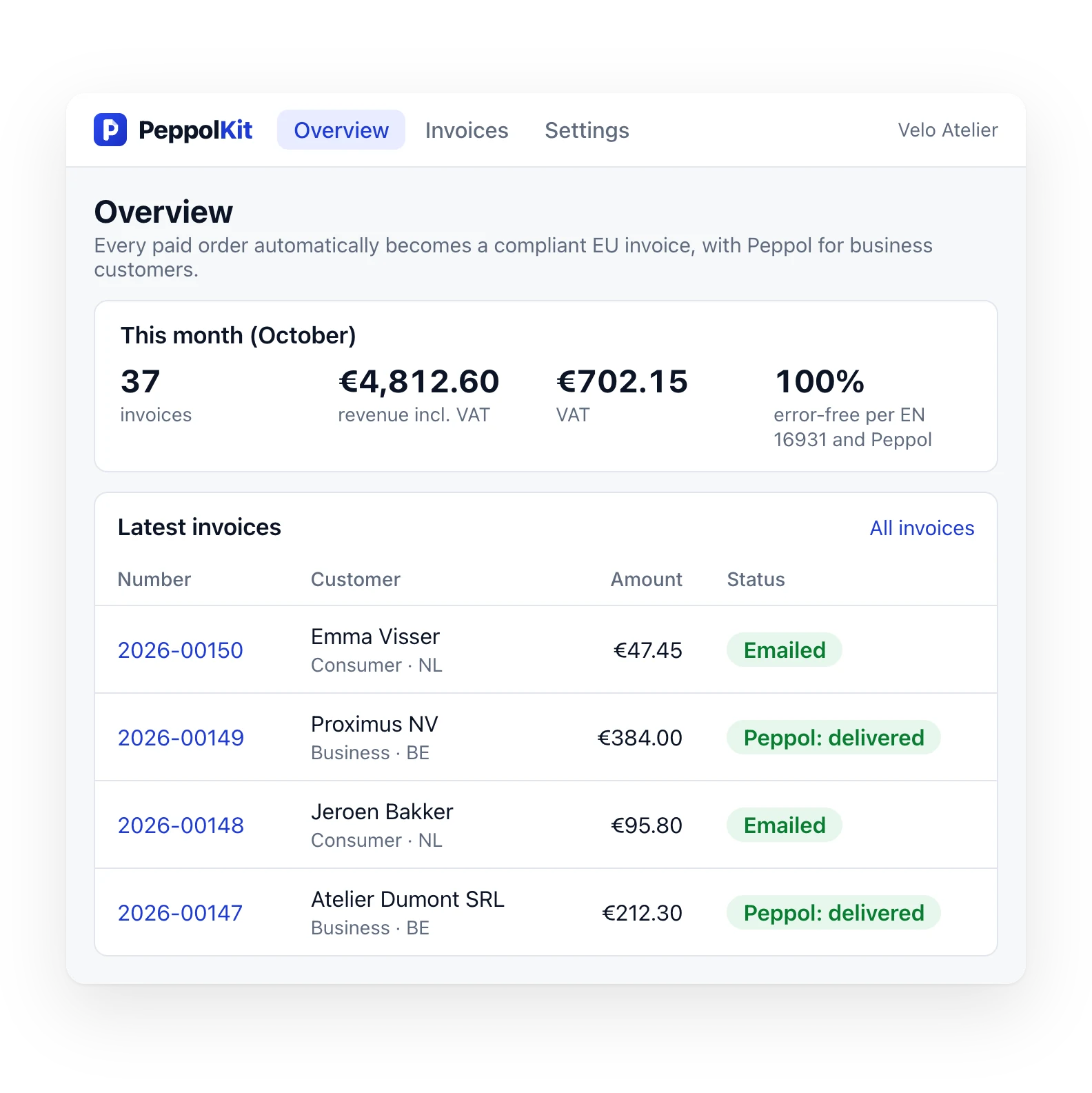
Four screens from the PeppolKit dashboard for your OpenCart shop, with what each one shows.

PeppolKit checks business VAT numbers in the EU register (VIES) and applies the rule: reverse charge, OSS for EU consumers, or 0% on exports.

Belgian shop? Every invoice to a business customer goes over Peppol through our partner SUPER PDP. On every plan, the free one too.

Every invoice is tested against the official EN 16931 and Peppol BIS 3.0 rules. Only an approved invoice goes over Peppol. If one fails, you see which rule and why.

Six PDF designs with your logo and brand colour. Dutch, French or English, chosen per customer.
To try it out, or for a shop with the odd business customer.
€0 / month
Start freeFor a webshop that sells to businesses now and then.
€9 / month
Start freeFor shops that sell to businesses every week.
€19 / month
Start freeFor high volumes and lots of Peppol traffic.
€49 / month
Start freeFor a Belgian shop, invoices to businesses go over Peppol automatically, with no cost per send. Consumers get their invoice by email; it counts as an invoice, but never goes over Peppol. Credit notes for refunds are included.
Shop in the Netherlands? You have no Peppol obligation. If you sell to Belgian businesses, send for free through your own Peppyrus account (up to 100 a month).
Prices in euros, excl. VAT. Monthly through Mollie, cancel in your PeppolKit dashboard. There's no trial: start with the free plan. Belgian shop? Every invoice to a business goes over Peppol, included in every plan and with no cost per send.
Yes, with the PeppolKit extension. Every paid OpenCart order becomes an invoice that meets the European standard (EN 16931, Peppol BIS 3.0). Business customers on Peppol receive it over the Peppol network, consumers as a PDF by email. Check whether a customer is on Peppol with the free Peppol check; when it is mandatory is explained in E-invoicing mandatory in Belgium.
OpenCart 4 and OpenCart 3. Each has its own zip: OpenCart 4 and OpenCart 3. Tested with 4.1.0.4, 4.0.2.3 and 3.0.5.1.
The first time it reaches a status you ticked as paid. By default those are Processing, Shipped, Complete and Processed. With a bank transfer or cash on delivery an order starts as Pending: the invoice follows as soon as you change the status.
OpenCart has no field of its own for that. Create one under Customers → Custom Fields: type Text, location Address, with VAT number in its name. PeppolKit reads that field, checks the number in VIES and puts it on the invoice.
Yes, since November 2026, as PeppolKit: invoices and Peppol e-invoicing. You can download the zip there or here; either way you upload it in your admin yourself.
In your PeppolKit dashboard you choose a plan and pay through Mollie, then automatically every month. The free plan has no end date and asks for no payment details.
OpenCart has no partial refunds: you set the order to a status such as Refunded. PeppolKit then creates a credit note for the whole amount that refers to the original invoice. You choose in the module which statuses do that.