Peppol for Shopware 6, as an app.

An app you upload in your Shopware admin, with no code in your shop. Every paid order gets an invoice with the right VAT, business customers receive it over Peppol, and a refund is followed by its credit note automatically.

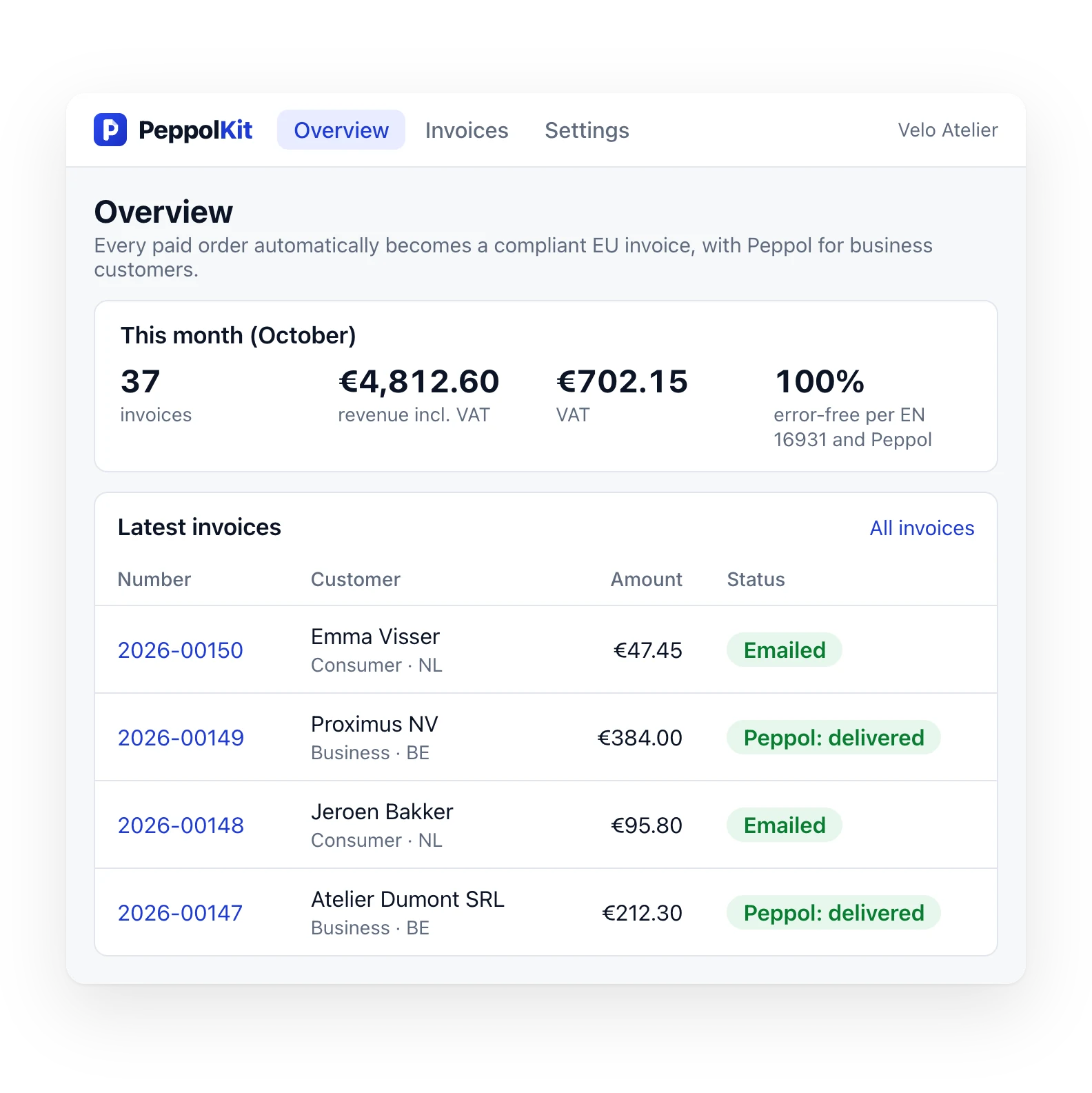
The PeppolKit overview in Shopware: your invoices, checked against the official rules and sent over Peppol
  • Shopware 6
  • Tested with 6.7
  • Dutch, French, English

Four things that take care of themselves.

01

With every paid order

As soon as an order's payment gets the status Paid, PeppolKit makes the invoice and emails it to your customer. Also when you set that status yourself in the admin.

PeppolKit

Invoice2026-00142
VATReverse charge · 0%
EmailSent
PeppolDelivered
PDFUBL
02

Over Peppol to businesses

Belgian shop? Every invoice to a business customer also goes out as an e-invoice over the Peppol network. Included in every plan, with no cost per send.

Invoice 2026-00149 delivered over Peppol
Download UBL ↓
03

With a refund

When you set a payment to Refunded, PeppolKit makes the credit note for the original invoice and sends it to your customer.

Credit note 2026-00151 for invoice 2026-00142
Download credit note ↓
04

Your customer's VAT number

Shopware asks business customers for their VAT number. PeppolKit reads it, checks it in VIES and applies reverse charge where it is due.

BE0123.456.789 ✓

Installed in five minutes.

  1. 01

    Upload the app

    Download the zip and upload it in your Shopware admin under Extensions → My extensions → Upload extension.

  2. 02

    Install and switch on

    Click Install next to PeppolKit, then Accept and install, and switch it on. Your shop is now connected.

  3. 03

    Fill in your company details

    Open PeppolKit through the three dots → Open extension and click Open the PeppolKit dashboard. Fill in your company number, VAT number and logo there.

Read the full installation guide →

What you see in PeppolKit.

Four screens from the PeppolKit dashboard for your Shopware shop, with what each one shows.

  • The right VAT, decided per order.

    PeppolKit checks business VAT numbers in the EU register (VIES) and applies the rule: reverse charge, OSS for EU consumers, or 0% on exports.

  • Peppol included. No fee per send.

    Belgian shop? Every invoice to a business customer goes over Peppol through our partner SUPER PDP. On every plan, the free one too.

  • Checked before it goes out.

    Every invoice is tested against the official EN 16931 and Peppol BIS 3.0 rules. Only an approved invoice goes over Peppol. If one fails, you see which rule and why.

  • Your invoice, in your customer's language.

    Six PDF designs with your logo and brand colour. Dutch, French or English, chosen per customer.

The same plans, in euros.

Free

To try it out, or for a shop with the odd business customer.

€0 / month

Start free
  • 20 invoices a month
  • Peppol included for every invoice to a business (Belgian shops)
  • No cost per send, no Peppol subscription of your own

Starter

For a webshop that sells to businesses now and then.

€9 / month

Start free
  • 100 invoices a month
  • Peppol included for every invoice to a business (Belgian shops)
  • No cost per send, no Peppol subscription of your own

Growth

Most chosen

For shops that sell to businesses every week.

€19 / month

Start free
  • 500 invoices a month
  • Peppol included for every invoice to a business (Belgian shops)
  • No cost per send, no Peppol subscription of your own

Pro

For high volumes and lots of Peppol traffic.

€49 / month

Start free
  • Unlimited invoices
  • Peppol included for every invoice to a business (Belgian shops)
  • No cost per send, no Peppol subscription of your own

In every plan

  • Reverse charge, OSS and a credit note for every refund
  • Invoice and email in Dutch, French or English
  • PDF and UBL file (Peppol BIS 3.0)
  • Factur-X/ZUGFeRD PDF for businesses in France and Germany
  • A monthly ZIP for your accountant
  • A reply within one working day, from a person

Examples

  • 8 invoices a month, 3 of them to businessesFree €0
  • 40 invoices a month, 20 of them to businessesStarter €9 / month
  • 200 invoices a month, 60 of them to businessesGrowth €19 / month

For a Belgian shop, invoices to businesses go over Peppol automatically, with no cost per send. Consumers get their invoice by email; it counts as an invoice, but never goes over Peppol. Credit notes for refunds are included.

Shop in the Netherlands? You have no Peppol obligation. If you sell to Belgian businesses, send for free through your own Peppyrus account (up to 100 a month).

Prices in euros, excl. VAT. Monthly through Mollie, cancel in your PeppolKit dashboard. There's no trial: start with the free plan. Belgian shop? Every invoice to a business goes over Peppol, included in every plan and with no cost per send.

What people often ask.

Can I send Peppol invoices with Shopware?

Yes, with the PeppolKit app. Every paid Shopware order becomes an invoice that meets the European standard (EN 16931, Peppol BIS 3.0). Business customers on Peppol receive it over the Peppol network, consumers as a PDF by email. Check whether a customer is on Peppol with the free Peppol check; when it is mandatory is explained in E-invoicing mandatory in Belgium.

Which version of Shopware?

Shopware 6. Tested with Shopware 6.7 (6.7.16).

Does it work with Shopware Cloud?

That has not been tested. PeppolKit is built as an app, the form Shopware Cloud uses too, but it has only been tested on a self-hosted Shopware 6.7.

Does any code run in my shop?

No. PeppolKit is a Shopware app, not a plugin. The zip holds only a manifest: no code runs in your shop.

When does an order get its invoice?

As soon as the order's payment gets the status Paid. That is also true when you set that status yourself in the admin. For orders that were already paid, the PeppolKit page in Shopware has a button that invoices the paid orders of the last 60 days.

How does my customer's VAT number get on the invoice?

Shopware asks business customers for their VAT number once customers can choose between private and company. You switch that on under Settings → Log-in & sign-up, with Show selection between company and private customer. PeppolKit reads the number, checks it in VIES and applies reverse charge where it is due.

How do discounts and shipping costs appear on the invoice?

A promotion or discount code is shown as a discount on the product lines. Shipping costs are a line of their own. Prices with and without tax both work, so customer groups with net prices do too.

In which language is the invoice?

In the language of the order, for Dutch, French and English.

Is the app in the Shopware Store?

Not yet. You download the zip here and upload it in your admin yourself.

How do I pay for a plan?

In your PeppolKit dashboard you choose a plan and pay through Mollie, then automatically every month. The free plan has no end date and asks for no payment details.

What happens when I refund an order?

When you set the payment to Refunded, PeppolKit creates a credit note for the whole order that refers to the original invoice. Shopware keeps no amount for a partial refund, so the status Refunded (partially) gives no credit note.

How do I disconnect my shop?

Remove the app in Shopware. That disconnects your shop from PeppolKit.

Your next Shopware order, invoiced right.

Free to install · Shopware 6